

The shift toward remote work and digital entrepreneurship has made online efficiency more important than ever. However, managing daily operations often comes with a steep price tag: bloated monthly software subscriptions that quietly drain your budget.
Fortunately, a new wave of browser-based utilities is changing the game. By leveraging modern free ai productivity tools, freelancers, remote employees, and content creators can automate repetitive tasks, polish client communication, and reclaim valuable hours every single week without spending a dime.
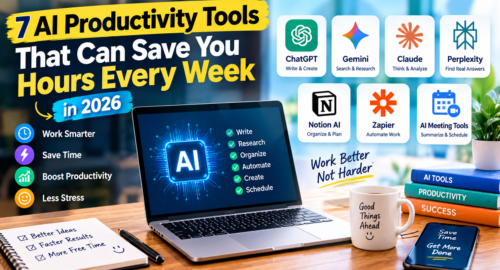
Whether you need to summarize complex market research, generate presentation decks on the fly, or clean up audio files, here are seven of the most powerful free ai productivity tools you should integrate into your daily workflow in 2026.
Why Modern Teams Rely on Free AI Productivity Tools
Traditional desktop software often slows down computer performance and requires manual file management across multiple devices. Modern web-based utilities eliminate this friction by running heavy computational tasks in the cloud.
When you incorporate free ai productivity tools into your daily browser habits, you gain several key advantages:
- Zero Hardware Strain: Fast cloud processing means even entry-level laptops handle intensive tasks effortlessly.
- Cost Efficiency: Replacing multi-tier subscriptions keeps overhead low for solo entrepreneurs and growing businesses.
- Instant Collaboration: Cloud links make sharing summaries, decks, and graphics seamless across distributed teams.
1. Perplexity AI — Sourced and Verified Web Research
Searching Google for specific answers often means scrolling through pages of sponsored links and cluttered SEO content. Perplexity AI transforms web research into an interactive, direct Q&A session.
- What it does: Synthesizes up-to-date internet data and generates concise, structured answers complete with linked citations.
- Why remote teams love it: Instead of opening 15 browser tabs to compare industry data, you get accurate summaries with verified sources in seconds.
- Best use case: Fact-checking articles, drafting technical briefs, and compiling competitive market analyses.
2. Gamma App — Instant Decks, Documents, and Webpages
Building visual slide decks in PowerPoint or Keynote consumes hours of formatting time. Gamma automates visual storytelling using responsive card designs.
- What it does: Converts basic outlines or simple text prompts into fully designed presentations, interactive documents, and web pages.
- Why it feels like a cheat code: The AI automatically selects color palettes, formats bullet points, and structures visual hierarchies so you can focus entirely on messaging.
- Best use case: Freelancers pitching prospective clients, startup founders presenting quarterly updates, and educators designing workshops.
3. Wispr Flow / Dictation — Hands-Free Voice Drafting
Typing extensive client emails and long-form project notes can quickly lead to mental fatigue. Modern speech-to-text engines have evolved far beyond basic transcriptions.
- What it does: Listens to your natural speech patterns, strips out filler words like “um” and “uh,” auto-punctuates sentences, and formats clean text in real-time.
- Why it boosts output: Most professionals speak three times faster than they can type, making voice drafting a massive productivity hack.
- Best use case: Drafting initial email responses, brain-dumping article outlines, and taking quick meeting notes.
4. TinyWow — The Multi-Utility Office Companion
Every digital worker frequently encounters annoying document roadblocks: converting a locked PDF to Word, extracting audio from video files, or resizing image assets for social posts.
- What it does: An expansive web hub featuring over 200 free utility tools for documents, media, and images.
- Why it stands out: While competitors limit free users to one or two exports per day, TinyWow provides accessible web tools without sign-up paywalls.
- Best use case: Daily administrative office tasks and quick document conversions.
5. Granola — Intelligent Meeting Notes Without Intrusive Bots
Many remote teams dislike meeting bots joining their Zoom or Google Meet calls because they change the casual dynamic of conversations.
- What it does: Records and transcribes audio directly through your computer hardware without sending an external bot into the meeting room.
- Why it saves time: It pairs the audio transcript with your personal rough notes, automatically generating structured action items, deadlines, and executive takeaways.
- Best use case: Client consultation calls, internal team standups, and strategic brainstorming sessions.
6. Cleanup.pictures — Instant AI Inpainting for Media Assets
High-quality visuals are essential for digital marketing, but unwanted elements often ruin otherwise great photos.
- What it does: Uses targeted AI inpainting to erase unwanted objects, background pedestrians, or text overlays with a single brush stroke.
- Why creators depend on it: It eliminates the need for expensive graphic design software for quick visual cleanups.
- Best use case: Social media managers cleaning brand assets and e-commerce stores polishing product catalogs.
7. Claude / ChatGPT — Versatile Drafting and Code Debugging
General conversational AI remains the foundation of modern digital productivity. Choosing the right tool depends on your primary task:
- Claude: Exceptional for long-form copywriting, nuanced editorial feedback, and synthesizing multi-page PDF documents.
- ChatGPT: Ideal for quick logic checks, coding and debugging web scripts, and conversational problem-solving.
- Best use case: Overcoming writer’s block, refining professional client proposals, and generating creative campaign hooks.
Comparison: The Top Free AI Productivity Tools
| Tool | Core Strength | Platform / Access | Best For |
| Perplexity AI | Direct web answers with citations | Browser / App | Fast web research |
| Gamma App | Prompt-to-presentation generation | Browser | Client pitch decks |
| Wispr Flow | Context-aware voice transcription | Desktop / Mobile | Long-form drafting |
| TinyWow | PDF, video, and image utilities | Browser | Office file fixes |
| Granola | Bot-free meeting summaries | Desktop | Client calls & notes |
| Cleanup.pictures | Background object removal | Browser | Fast photo retouching |
| Claude / ChatGPT | Text drafting & technical troubleshooting | Browser / Mobile | General digital work |
Maximizing Your Workflow with Free AI Productivity Tools
You do not need an enterprise software budget to operate at peak efficiency. By integrating these dependable, free ai productivity tools into your daily routine, you can eliminate mundane administrative friction and focus on high-impact work that actually moves your business forward.
For more curated guides on modern digital resources and online productivity, explore our latest guides on BeWebStuff
Which of these free ai productivity tools will you test first in your workflow? Drop your favorites and personal tool setups in the comments below!